Wednesday, April 4, 2012

The Last Post

Alas -- I've finally had to accept that my time at Wilkes has come to an end. This morning I changed my Twitter id from '@suheatwilkes' to just plain me '@suehellman'. Now I'm writing the conclusion to this blog and moving on to new pursuits.

I want to thank all the people at Discovery and at Wilkes for a wonderful learning experience. It changed me as an educator in ways I never imagined when I applied to the program. The lessons learned and understandings gained continue to reverberate as I read, respond, write, participate, share, and develop new learning experiences for colleagues and young people.

My first blogging service, Posterous, has recently been bought by Twitter, but for now I'll be doing my online writing and reflecting from there --
Small Changes; Big Returns at http://bigreturns.posterous.com/.


Thursday, December 8, 2011

December countdown -- "ideas to inspire" + "A+ Click Math"


If you're at the point in the Wilkes course where you have to figure out something interesting to do with Google Earth, there's a slide show of activities in this impressive collection of presentations to help you. If you have a cool idea, pick the presentation it fit, email Anthony Evans (skinnyboyevans@gmail.com) for the link to the Google Doc presentation, and create your slide.


This is such a great tool for individual math problem solving review. The problems are mixed with multiple choice images and the program sends the student to the next level when 5 have been solved correctly. Set a timer on the whiteboard and see how many questions the kids can solve as a group in 3 minutes. OR let them play on their iPads when they're squirmy. When the page size is smaller, the display switches to fewer columns so there will be no scrolling on smaller screens.

Enjoy!

Tuesday, November 15, 2011

Potpourri or Potluck: collected ideas and tips from Digital Inspiration

I'm cleaning out my in-box and today's target is Digital Inspiration. (My goal is to clear out 50 each day.) Amit Agarwal was one of the first tech bloggers I ever read, and he remains one of my favs. Hpwever, when I get behind in daily processing, his blog is one I skip because it's often so pithy, I know it will take me a lot of time to process and post the information.

Here then is a list of great ideas and tips from the past several months:

1) Using a QR code to give conference attendee access to your presentation slides and other handouts -- could also work in a class where the kids are allowed to use smart phones or have iPads to update them on homework assignments or where class presentations have been posted

2) How to check multiple Gmail accounts without signing out -- one bit of advice I use in my workshops is for teachers to create class gmail accounts, to register with online websites for classes using the gmail address, and then to have students work online using these accounts. This negates the need for them to register and gives you complete control of each all websites used. Keep the names and passwords easy to remember and meaningful.

For example: ourschoolgr5[at]gmail[dot]com could be the gmail address and the user name and password might be something like Oursch1Oursch2. That password is tricky enough to be accepted by 95% of websites but easy enough for the students and you to remember. [Note sub in your school's name or initials and your grade or class or block to make it fit your needs.] Be systematic and develop a naming convention, but keep the names generic enough that you can roll the accounts over from year to year or semester to semester.

3) The Google Earth Clock displays the current local time in your browser using satellite imagery from Google Earth / Google Maps.


4) Faking screenshots could be an interesting way to start a lesson on authenticating sources. Have students start with an original image and then alter it. Post a collection of 'reals' and 'fakes' and ask students in the school to vote. Here's another article that may stimulate some discussion and a link to an early post of mine about Authenticating Sources.

5) For librarians -- how to track new books with Google Alerts

6) See how far you can travel in a given time -- this could be an interesting one for math classes. Have students work out a radius the traditional way and then compare it to the map on this website. They can discuss the factors what might affect the outcome.

7) Create your own Google Maps -- if you like the idea of Google Lit Trips but don't want to take the time to have students work with Google Earth, try this simpler way to map historical events, literary works, scientific discoveries, etc.

8) Create a flippable e-zine that will work on iDevices as well as traditional computers using Themeefy -- this could be a great way for a student to compile an eportfolio of work created and posted elsewhere on the internet.

9) Another way to curate-- using Bo.lt which replicates webpages so that even if they cease existing on the internet, your reference will not disappear. "You may also use Bo.lt to save and archive web pages that require login" -- instead of using screenshots which is what I do at present to preserve all login information.

10) Sometimes PC desktops just do it better -- one keyboard, one mouse, multiple computers, multiple screens -- create your own command central for multitasking. See also Synergy if you mix platforms.

11) Learning about colour editing if you don't know much about it

12) Tip for repositioning a window on your PC when sreen recording

Happy Thanksgiving to all my American readers!

Wise words

========
I love the message in this presentation. There's plenty here for students to consider when creating multimedia presentations of any sort.

Source: Digital Inspiration (one of my favourite tech blogs)

Sunday, November 13, 2011

An interesting tools mashup for EDIM students

When annotating and social bookmarking are too cumbersome, and you want to
  1. keep track of a specific passages (or image?) in several articles
  2. keep a list of those references for your bibliography
try using
  1. CITEBITE which creates a unique URL for a highlighted portion of a website, AND
  2. WEBLIST to compile those URLs into a personal list

Wednesday, November 2, 2011

Tundra Connections update

1) Class registration page at http://www.surveymonkey.com/s/TundraConnectionsPoweredByEdmodo

2) Education tools and materials

3) Events list (click to enlarge)

Monday, October 31, 2011

Tundra connections Nov. 14-16


[Live cam]

Join a live, free webcast from the tundra during the peak of the polar bear migration near Churchill, Manitoba, Canada through Edmodo. Here's the information link -- http://blog.edmodo.com/2011/10/28/save-the-date/

News from Churchill http://www.polarbearsinternational.org/events-and-news-from-churchill-manitoba

Link to Facebook http://www.facebook.com/PolarBearsInternational

Link to PolarBear Cam above http://www.polarbearcam.com/#Page1

Tuesday, October 4, 2011

Embedding when there is no embed code


Today I'm updating my Web2.0 and math Wikispaces to prepare for an upcoming workshop. I want to have 2 projects to display on the wiki page, so readers don't have to use link away from the page in order to see them. The problem is that the sharing options o n these pages give only the URL links -- no embed code.

Embed code is a snippet of HTML software writing language. O.M.gosh! I hear you moan. Now I have to learn another language in addition to figuring out how the tools work. Well, this is kind of like learning enough French to ask how to get to the nearest cafe in Paris. Once you understand some of the basic 'catch phrases' and what they do, you can adjust heights and widths so the display works in your own wiki, blog, or class website. I found the information at WebSource.


In Wikispaces once you're in edit mode, select Widget from the menu bar and then Other HTML which is at the bottom of the list of options.


Next you need to copy and paste into the box the embed code provided by WebSource. You'll find it about half way down their page shaded in grey.


Two steps left:

(1) The given code will display a page form the WebSource website. You want your choice to show up, so you have to change the URL in 2 places. Copy it from the address bar and paste it into the code.

(2) You may have to adjust the width and height. Again, make the changes in 2 places. This may take a few tries to get them just right for your website and for the devices your students are use most often.

This worked on my wiki page, but it's created a small glitch when I want to edit the page. I now get a message that says I'm missing a plugin (which cannot be found/I'm using XP). Also when I saved, I got an error message when I'm saving.


I click 'OK' and it all seems to be working fine except for that plugin message. Ignoring it seems to be the best plan. If I solve the problem. I'll let you know. I suspect this has something to do with the pages I've embedded being interactive.

The resulting web page is too big for this blog, so I'll have to link out to it. (Sigh!)
Feedback would be appreciated.

Saturday, October 1, 2011

Badges -- reward or recognition


Badges seem to be the new hot ticket in many classrooms today, but I have to say I'm not really comfortable with implementing what is essentially a points-based reward system. I'm not convinced that these kinds of extrinsic rewards pay-off with long term behaviour change, and I think the novelty wears off for children at a certain point.

I have been reading about a different use of badges that is more like the old Scout & Guides system. In this case students pick areas of special interest or talents or outside activities or things they want to learn or skills to remediate and work on them because they want to (intrinsic). The recognition of work done or learning accomplished or contribution made is a badge. The teacher and class can decide on what kinds of badges they'd like to work on, what the criteria for achievement will be, how it will be judged and by whom. The kids can be judges or you can get peer tutors involved in this. Students who feel their special talents aren't represented can ask that a new badge be created.

If one criterion of badge-earning is having to relate the work to curriculum in some way, then students can be set the problem of figuring out how to meet that expectation and this can become a platform for independent project-based learning with a real world dimension.

I'm creating a one-week Moodle learning event on SmartBoards that's due to run in the spring, and I want to introduce to it the concept of working on a badge over the week. I've figured out how to make the Moodle less linear and more website like so people can make their own connections and have even found a Moodle module that will allow the awarding of what they call 'stamps' and I'll use for badges. So far I envision an 'Explorer badge' for people who go on safari and bring back interesting files, links, and resources to the group. If I'm a bit cagey in the way I put this together they should have to cross topics to complete their badge. I hope this will accommodate those who want to create a new file, experiment with different features of their boards, become more expert at something, explore other resources and add to our collection, and so forth.

There's a movement afoot to introduce lifelong learning badges into the world, and perhaps this idea for a self-study course -- with badges that can be displayed on a blog or website somewhere else -- might have some appeal.

For more information there's a new Scoop on the topic at http://www.scoop.it/t/badges-for-lifelong-learning.

Monday, September 26, 2011

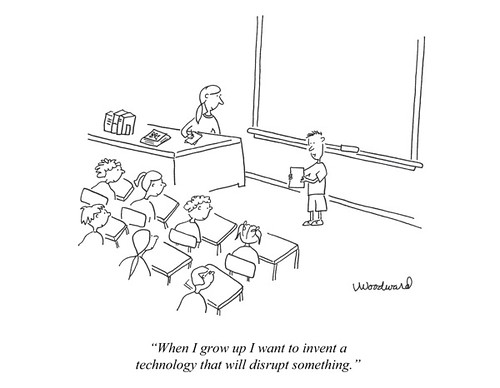
Where is the leading edge in education?


I came across a post from a Change11 blogger who has just graduated with a degree in cyber anthropology. Before today I'm not sure I'd have thought that cyberspace has been around long enough to warrant an anthropological approach, but I suppose given the rate of change in the technology world, that you have to count time like we do dog years. One year in cyberspace equivalent to __?__ in real world years. Is 7 enough? Is 100 too many?

Anyway in my search for a definition, I came across what was a cutting edge article in 1994 by Michael Strangelove: The Geography of Consciousness. It appeared in WAVE, "the first European newsstand magazine about digital convergence, internetworking, and the emergence of cyberspace."

Here is a quote from the final paragraph:
"If you want to see the future, ... look into cyberspace. When you have arrived there, listen to the multiplicity of voices. Watch for the appearance of those who become empowered through bypassing the gatekeepers of mass communication. ... The new technology of communication, the new geography of consciousness, the new technique of existence combine to form a linchpin on which the whole world is about to turn."
Is there such a thing as educational anthropology? Is there any urgency to look back less than 20 years because so much that is important to understanding the roots of current practice, growth, and change may be lost if we don't?


Image source: Vicki Woodward 03-14-11 blog.xplana.com/2011/03/disruptive-technologies-cartoon/

Monday, September 19, 2011

Making peace with constructivism: towards a landscape of coherence

Readings:
~Narratives of coherence by George Siemens (http://ltc.umanitoba.ca/connectivism/?p=61)
~Teaching in Social and Technological Networks (http://www.connectivism.ca/?p=220)
~Constructivist Learning Theory (http://www.exploratorium.edu/IFI/resources/constructivistlearning.html)

For some time I've struggled with constructivism. Surely, I've wondered, there's a lot of knowledge that's just better passed on in the old way -- taught directly by a person who understands it well. Would I want to entrust my body to a surgeon who'd completely constructed his/her own learning? Would I want to buy a house wired by a completely self-taught electrician?

Unfortunately, for some students, when their teachers implement a constructivist model, they abandon the role of instructional leader in the name of giving students responsibility for their own learning. Such teachers laud the value of peer-to-peer sharing and helping, but what they fail to see is that often the stronger students just take over the instructional role they (the teachers) have abdicated -- that of providing direct teaching to those who need it. (I suspect that in some constructivist classes, there's plenty of direct instruction going on. It just isn't emanating from the teacher.)

A few days ago, I came across the term "narrative of coherence". Aha, I thought, here's the secret that will save me| I thought it would fill in the middle ground between traditional delivery and extreme constructivism with some vision of how to infuse learning experiences with an underlying narrative that would give students' explorations coherence. But when I read the articles (top 2 above) more thoroughly, I realised the phrase was used as a sort of educational pejorative.

'Narrative of coherence', it seems, is a way to describe what traditional teachers do. They work out the setting, plot, characters, and theme and tell the whole story to their students who learn it by listening and studying it over and over until they know it by heart. Reaching the end of a lesson is like coming to the end of a chapter when a bedtime story is being read. Learners learn to wait until the next lesson to find out what happens next. The problem isn't so much that students don't learn the story (for many do and have), but that they hear only one story with an ending that always comes out the same way.

I firmly believe that well-crafted learning experiences must offer COHERENCE. I grew up as a teacher when 'discovery learning' and 'concept formation' were the progressive ways to teach. We believed back in 1974 that this was the way to put an end to the 'learn & forget' cycle (sound familiar???) because learning would become a sequence of 'aha' moments. I remember one day trying to lead a young fellow through the process of discovering how to do long division. I patiently laid out the bread crumbs that should have resulted in the magic moment of concept formation, but it just bewildered him. Finally he pleaded: "Please, miss, would you just teach me how to 'dibide'? I just want to know how to dibide!!!" So I did it the old way and after a few practice examples, he went away relieved and happy. For me it was a lesson learned.

But perhaps it was one I learned too well. Over the years I became a great educational story-teller, and my kids learned my narratives well, but for many that's where their understanding and questioning began and ended. Job well done, I thought -- but in retrospect it seems like a job only partially done.

So this morning I've been working on a new metaphor -- 'landscape of coherence'. I once read that mathematicians see a landscape of math. Like a virtual world, for them math has geography that is navigable and can be learned, enjoyed, used, enhanced, changed, and perhaps even destroyed. I think perhaps this metaphor has some power for educators as well. Perhaps the middle ground I've been seeking between narratives of coherence and radical constructivism is 'landscape of coherence'.

This landscape has important landmarks with some pathways connecting them, but the way you move around in it your way is determined sometimes by need, sometimes by signposts, and sometimes by interest. Instead of leading students down one garden path or telling them one story, teachers have to make informed decisions about what the critical landmarks are and then ensure the students understand & master those. As a complement to more traditional learning, we make the students responsible for working out their own meaningful connections, and we make time for sharing, comparing, crowd sourcing, and reflection (when we contribute our own perspectives as one of many).

When you revisit a learned landscape after a while, it's still familiar because it was extensively and intensively explored. You can revisit old landmarks and retrace old paths, but you'll also appreciate how the big picture has changed with time.


(Video Link: Rotating Earth Animation)

The key then is for the teacher not to refrain from making any decisions, but to give up on trying to teach everything to everybody in case they might needed it sometime -- because it never takes anyway. Our job is to do the much harder work of being selective -- of making better decisions about what the important landmarks are-- and to then ensure our students know how to fulfill their role in this new paradigm.
And so I think I've finally made peace with constructivism. I guess you can teach an old dog new tricks.

Wednesday, September 14, 2011

A super multimedia project & one cool tool

I just came across this video today. What a superb project that blends math, science, geography, and language learning with interesting videography as well !!!!!


If you do/did the Portable Video course with Frank Guttler, you'll be familiar with Photostory. it's the free Microsoft program that adds Ken Burns effects to simple slide shows.


Wow Slider enables kids to create stunning visual Java slide presentations for their blogs, wikis, or websites. The download is free for personal and educational (non-commercial use). They've added interesting transitions and the Ken Burns pan and scan effect as well.


I was able to follow the how-t0 explanation down to the part where it says how to post, but I think that after I try it a couple of times, I should be able to figure that out.

Tuesday, September 13, 2011

Howard Gardner interview today

This quickie post will be of special interest if you're taking or have yet to take EDIM 508. You'll be reading and blogging about Howard Gardner's Five Minds for the Future, and Gardner is being interviewed online by Steve Hargadon at 5PM Pacific time today (Sept. 13). You can find the link to the Blackboard Collaborate room in Steve's blog at http://www.stevehargadon.com/2011/09/live-tuesday-sept-13-with-howard.html. Perhaps I'll see you there.

Link to video http://bcove.me/o82j7nsl

Saturday, September 10, 2011

change.mooc.ca begins next week


MOOC stands for 'massive open online courses' and this one promises to be a doozy. At present the schedule lasts 36 weeks each of which is being 'minded' by a different speaker. There will likely be over 1500 participants (and you thought your classes were big!!).

My main concern is that trying to keep up with so much incoming information may push me out of interested learner mode into being an overloaded procrastinator and finally into just dropping out. How do you scan RSS feeds from over a thousand co-participants' blogs? and stay current with the backchannel? and process the weekly discussions? and make meaningful contributions? and find people with whom you want to develop more personal and lasting relationships? and archive interesting links, comments, resources? and not end up swamped by the sheer volume of inputs?

I have an idea that it may make sense to follow a suggestion from Steven Bell who did a session last week in the TLT Friday Live free webinar series -- that is to create a small team, divide up the task of filtering, and create a way to update and share with each other the most promising/interesting/provocative inputs, and perhaps meet on a bi-weekly basis to share new insights.

If anyone's interested in trying change.mooc.ca and forming a team to try this, please let me know either in the comments below or through the Facebook page.

Link to 'What is a MOOC?' video http://youtu.be/eW3gMGqcZQc


Link to 'What is a MOOC?' video http://http://youtu.be/mqnyhLfNH3I


Link to 'Success in a Mooc' video http://youtu.be/r8avYQ5ZqM0

Sunday, September 4, 2011

'm' apparently no longer stands for 'mother'

I'm helping to put together a one week, Moodle, pro-d event about mLearning -- with the 'm' now signifying 'mobile' and am in the 'search for ideas' stage. Today I came across this wonderful video I thought I'd share.


I'd love it if you'd be willing to share ideas, resources, websites, blogs, wikis, and especially student projects that I could incorporate into this project. To help me out, please leave your links below or respond on the Facebook page. THANKS!!!!!

[BTW, the event will be open to anyone who wants to join in the fun, and certificates will be available to participants who want them. It will be late in October, and I'll post the registration information here when we get a little closer.]

-------------------------
Late breaking FYI --

Wikispaces has added a new feature called Projects to all educational wikis. This gives you a way to coordinate small group work inside one wiki by creating teams and assigning permissions.

P.S. I'll have to explore whether this can work for Canadian students as the kids apparently must join the wiki in order to be assigned to teams. If they can do this without having to register their personal information anywhere then this is a tool we Canucks can definitely make use of as well.

Monday, August 15, 2011

Big Ideas

One of the things I struggled with when I was in the EDIM program was writing 'big ideas'. This might have been because I tried to use many assignments to grapple with how to apply a lot of what I was learning to the teaching of high school math. Math people haven't given much attention to the need for big ideas that could draw people into their content.

In math, big ideas are defined this way (R. Charles, Journal of Mathematics Education Leadership, Vol. 7 No.3) :
" a statement of an idea that is central to the learning
of mathematics, one that links numerous mathematical
understandings into a coherent whole."
and here's an example:
"Any number, measure, numerical expression, algebraic
expression, or equation can be represented in an infinite
number of ways that have the same value."
Now that idea can be a beautiful thing to a mathematician and it's clearly an underlying understanding or concept that we aim for students to develop over time, but having that knowledge hasn't helped me see it's value or importance or usefulness outside the walled garden of math.
[Image Credit: CC Attribution. Kent Barret, 1 Apr. 2005.]

One of the higher ed bloggers I follow is working on how to make the big ideas of physics and computational computing more accessible to his students.

vpython cvpm explanation from occam98 on Vimeo.

Now I have only a rudimentary understanding of physics and first heard about computational computing a couple of weeks ago when I watched Stephen Wolfram demonstrate Wolfram Alpha, but John Burk has made me wish I could take his class. He's managed to connect the dots from common ground topics of space and weather (who hasn't gazed at the moon or complained about bad weather!) to his content by showing his students some 'why's.

Lately I've been doing quite a bit of reading about how the folk in higher ed are struggling with the why's, how's, and what's of improving their teaching skills. Similar to the way that many K-12 educators have been reluctant to adopt new technologies, some higher ed folk are finding it challenging to change their way of thinking about learning and teaching. I think perhaps in both cases the reluctance may stem from not seeing the why's -- or perhaps it's because that for many educators, figuring out our why's is something that takes place in the formative years of our careers. Maybe it's like developing a personal fashion sense or a look when you're young and after that you always dress the same way unless/until something forces you to see yourself in others' eyes and you don't like what looks back at you.

[Image Credit: It Can't All be Dior blog, 20 Apr. 2011]

I think 'getting to why' is perhaps one of the biggest big ideas of our profession. Perhaps under all the reasons people give for not wanting to engage in this kind of educational overhaul (too much work for too little return, just a fad, no time, too much important content to cover, won't help on the test, doesn't work in my subject) lies these two simple facts:
  • those of us who have made the paradigm shift have not done the work of making the why's explicit in as enticing and elegant a way as John Burke has done with his one simple idea and his one big idea.
  • my why's (I'm an adult; I liked math; I didn't struggle in school) are not everyone else's (especially my students').
So ... we haven't revealed the connections in a compelling way to those who find them the most difficult to see, and we have become frustrated and tended to blame them for not 'getting it'.

Hmmmm ........ sound familiar?

Thursday, August 11, 2011

Debriefing EdmodoCon11

There's a little folder that sits on my desktop called 'Webinars'. In it I stash the notes I take as I watch & listen. Between the speakers and the chat there's so much to absorb that I try to get down as much as I can -- screen shots of great slides, links, copies of pithy comments, and ideas I want to be able to review later.

Most of my webinar files are between 10 and 125kb in size. 300kb was large until yesterday, but, thanks to an early morning tweet from Jennifer Brinson (Jen is a Wilkes EDIM alum), I spent from 10:30am until 6:30pm at EdmodoCon. This was an online conference put together to showcase innovative mashups of high quality teaching/learning, ed tech, and Edmodo. 18 speakers from the US, Canada, Brazil, and Australia talked to nearly 500 attendees sitting at their computers all over the world. EdmodoCon's file in my webinar folder is 21,457kb. That's over 100x bigger for only 8x longer (by time) than ever before. No wonder I was so exhausted by the end of the day!

The sessions were archived. To access them together with all associated materials and links, either register with Edmodo (or reactivate an old account) and use the group code (1bbsgy) to join the EdmodoCon 2011 group or keep checking back to their blog.

I really want to use this post to award Betsey Whalen a huge badge and a billion points (and hope she gets a huge promotion -- sorry -- inside joke for those who saw the Gamification session) for keeping her energy so strong and infectious all day.

Wonder Woman Stamp

[Image credit: CC Share/Attribution, 11 July 2007, ann-dabney/355168866]

She set the upbeat tone, kept everything pretty close to on schedule, and pushed through the few moments of tech glitches without letting the momentum of the event dissipate. For me the most important take-away from the entire Edmodo marathon came from Betsy after Carol Anne McGuire's session about her world-rocking projects. Carol Anne started her presentation by talking about how she became inspired to transform her own teaching. Here's an example of the most recent result:


When Betsy reflected after Carol Anne was done about how this wonderful explosion of remarkable work had come out of an inspirational moment at a pro-d session, she summed up in one moment for me the value of being in contact with interesting people who are passionate about what they do and act on their passion. How many educators see the potential of their work as giving our students moments like that?

---------
Final note: I've also bee thinking today, not about any single conference session, but about how Edmodo has evolved over the years from the the educational microblogging tool it first was into a resplendent content delivery, communication, and learning platform.

[Image Credit: CC Attribution, 14 Dec. 2009, jesusbranch/4184450383/]

By incorporating the features the users have requested, its developers have grown this tool from the grass roots up. One speaker who just started using Edmodo last year mentioned that he'd sent in about 12 suggestions and that most (if not all) have appeared in the newest version. Edmodo was designed not based on someone else's idea of what teachers, students, and admins need and want but by listening and responding to real needs and real wants voiced by real users in the real world, and its users wax rhapsodic about how it's literally changed their educational lives.

There was one EdmodoCon presenter who said his 'aha' moment about thinking about what teaching and learning could become came when he saw the parallels between gaming and schooling. Hmmmm ..... I'm seeing similar parallels -- but between Edmodo's responsive growth model and learner-centered education. Could this be a metaphor or a template for creating learning experiences that leave people wanting more?

Inspiring words for all teachers

#46 - Back To School
[CC Attribution: JohnONolan, 17 July 2010, from johnonolan/4816798476]

Print this. Tape it somewhere in your class where it won't get buried. Make it your computer's wallpaper. Add it to the notices on the photocopy machine wall (if your school hasn't gone paperless). Put a copy in your car and reread it in the morning before you step out in the school parking lot. Pass it on to a colleague who's getting a little lost.

An Open Letter to Teachers

Friday, August 5, 2011

Educational mindshifts & a new tool: Highlighter


I'm reading a blog called Mindshift these days. It's about grasping the opportunity to shape how learning will occur in the 21st century. After all, we're already over 1/10th of the way in. It's time to accept that technology + tough economic times + pressures on educators at all levels to better meet students' needs have combined to make a 'perfect storm' in our field.

Having survived breast cancer, it's always on my mind that I might have a recurrence. Should that ever happen, there's one thing I know for sure: my very survival will depend on doctors who make the best uses of the newest technology and techniques available to them. Yet somehow when it comes to ensuring that this generation of children receives the best quality education, a vision of orderly rows of obedient learners absorbing all the information they can like sponges and giving it back skillfully on tests is what springs to many minds. Surely educating minds is as important as curing people when they become ill!!!

Educators now have crucial choices to make for the kids in their care -- do we continue to sit like big rocks rooted to the bottom of a river resisting the flow of the water until a flood finally pushes us along ...

(image credit: Glenn Scofield Williams, May2008, from Flickr CC)

or do we learn now how to read the current the best we can and take advantage of the flow to create a truly exciting ride?

(Image credit: Steve Collis, Oct 2009, in Flickr CC)

We can take a 'wait and see attitude' or become active participants in determining what education looks like 10, 20, or even 50 years from now.

Today's issue of Mindshift-- Turning Static Text into Interactive Discussions -- provides links to two interesting online learning courses: BioFundamentals by University of Colorado biology professor Michael Klymkowsky and Chemistry, Life, the Universe, and Everything by Melanie Cooper at Clemson University. They are using a new free tool called Highlighter to provide students with a way to interact on the course site and also collect feedback to guide further teaching/learning.

(I've installed Highlighter on this blog. Try it, and send me some feedback. If you see a toolbar at the top, clicking the arrows at the right will make it recede.)


Highlighter from Highlighter on Vimeo.

There is lots that could be done to make these examples even more student-friendly, but these educators are clearly trying to come up with workable solutions to the problem of how to improve the teaching/learning of science at the post-secondary level while at the same time coping with severe constraints such as funding cutbacks, huge classes (200-1500 in some places!!!), and the durability of old paradigms:
The recent emphasis on the science education system is based in large part on the perceived need to broaden the appeal of science and deepen appreciation for the scientific approach’s value when thinking about a wide range of phenomena. While the current system is demonstrably adequate for those who succeed in it, it actively discourages the majority of students. All too often, the function of a science or math course is perceived by students (and, sadly, by some faculty) as a sorting mechanism rather than an opportunity to learn (and teach). This is a perception that can lead to the loss of important contributions and talent as well as misunderstanding of and hostility toward science within the broader community.

While higher ed teachers have lots of technology and content expertise, they're in the process of learning how to be better teachers.


This way of thinking about the teaching/learning interaction may seem pretty fundamental to us K-12 folk, but the solutions the higher ed folk are coming up with: 'demand' lectures; collecting data on the fly so you start a class knowing what needs to be reviewed/retaught; just-in-time-teaching; paying more attention to the flow-through from pre-class, to in-class, and then post-class learning so it all contributes to student's shouldering more of the responsibility for creating the quality of their learning -- these are processes we need to look at more closely.

Blended learning is new at the K-12 level, but it's going to put a lot of pressure on how we do our work. In my former district, the e-learning division is growing at an unprecedented rate, and you can be sure that if the educational decision makers see it saving money and working reasonably well in the largest school district in my province, they will be pushing other regions to make more use of remote learning. More and more classroom teachers will soon feel the competion from this cheaper delivery model, and we'd better have something very special going on in our learning environments to set our work apart and keep our services essential.

At its heart, science works as a highly interactive community. At the same time, it is possible for a single person to challenge and change accepted scientific understanding. That is not to say that it is easy to change the way scientists think; after all, most challenges to well established theories are wrong, and it is generally a waste of time to think about them seriously. That means that a new way of looking at a phenomena must be clearly superior, both in terms of accuracy and explanatory power, to the ideas that it wishes to displace. It must explain more than the old ideas, and it must resolve problems that an old idea was unable to adequately explain. It is this tension between consensus, conflict and resolution that drives scientific understanding forward, so that, in the end, more and more phenomena become explicable. Through its fundamental ability to accept change, science has come to provide the practical knowledge needed to manipulate and understand the material world.

If you replace the words 'science' and 'scientist' with 'education' and 'educators', this statement could become an interesting template for educational change.

Wednesday, August 3, 2011

Popplet Mind Maps

I was getting to ready to work on another post about a great presentation on blended learning that I watched yesterday. I want to compare what was 'old school' (for us K-12ers -- this was for "higher" ed.) to what is really different, but that's a story for another day. Anyway, as usual, I started looking through Google and stopped at Go2Web20 (tag:mindmap).

(click any pic)

I love this search engine. The tagging system is superb, and the blog makes for an interesting reading. The general categories are quite broad to help you see how companies are thinking outside traditional uses of familiar processes. But it's so easy to get sucked into wonderful distractions, that you might not get your work done in a timely fashion. I spent quite a lot of time with Creaza and Trail Me.)

The tool I want to write about today is Popplet which is a collaborative online tool with an iPad app ('lite' vs is free, full-featured is kind of pricey at $4.99).

Other bloggers describe this as a pumped up version of Wallwisher (see Larry Felazzo's blog) because it's a kid-friendly way to collect, bookmark, and organise information, ideas, websites, and media. You can connect Popplets, embed them, and export or print them. Users have to register, but if you have a class gmail account, you can give the students access without their having to put their own information online. I keep the email account name and password the same to make it easy to remember. This is also a great way to control their content.) It will look great on a SmartBoard and there's a little bookmarklet tool for your toolbar so as you come across content that will work with a presentation, you can update the appropriate popplet.

This tool is one I'll be adding to the list people can play with at my workshops.

-------------

BTW -- I also came across Mark Warner's collaborative presentation for uses of WallWisher. I'm sure the ideas can be used with Popplet as well. Enjoy!


https://docs.google.com/present/view?id=dhn2vcv5_436f8kscmdc

-----------
Hey! I just figured out how to reduce this presentation to fit in the small display space provided in this blog. Simply cutting the width (to 400 for this blog) and height (proportionally either by estimate or using a ratio -- great math lesson!!!!) in the HTML code, cut off a big chunk of the Google Doc, but reducing with the 'amp' (whatever that is) to .75 as well did the trick. Hmmmm ... there's a lot to be said for trial and error learning when you have the time to play and an environment where there's immediate feeback!